Crisp Chat homepage teardown: how the landing page changed over 4 years
Crisp's homepage didn't just get updated. The headline, section headings, CTAs, navigation all shifted in a consistent direction between Jul 2022 and Jun 2026. This teardown maps what changed, when, and what the patterns may suggest.

3 visual snapshots compared
Audience signal changed
Significant structure changes
Navigation overhauled
Homepage snapshots over time
Each thumbnail shows the above-the-fold area of the homepage at that point in time. Scroll to compare.
Biggest visible changes
Three moments that capture the arc of the evolution.
The original: product-led messaging
Click to view full screenshot
- 01
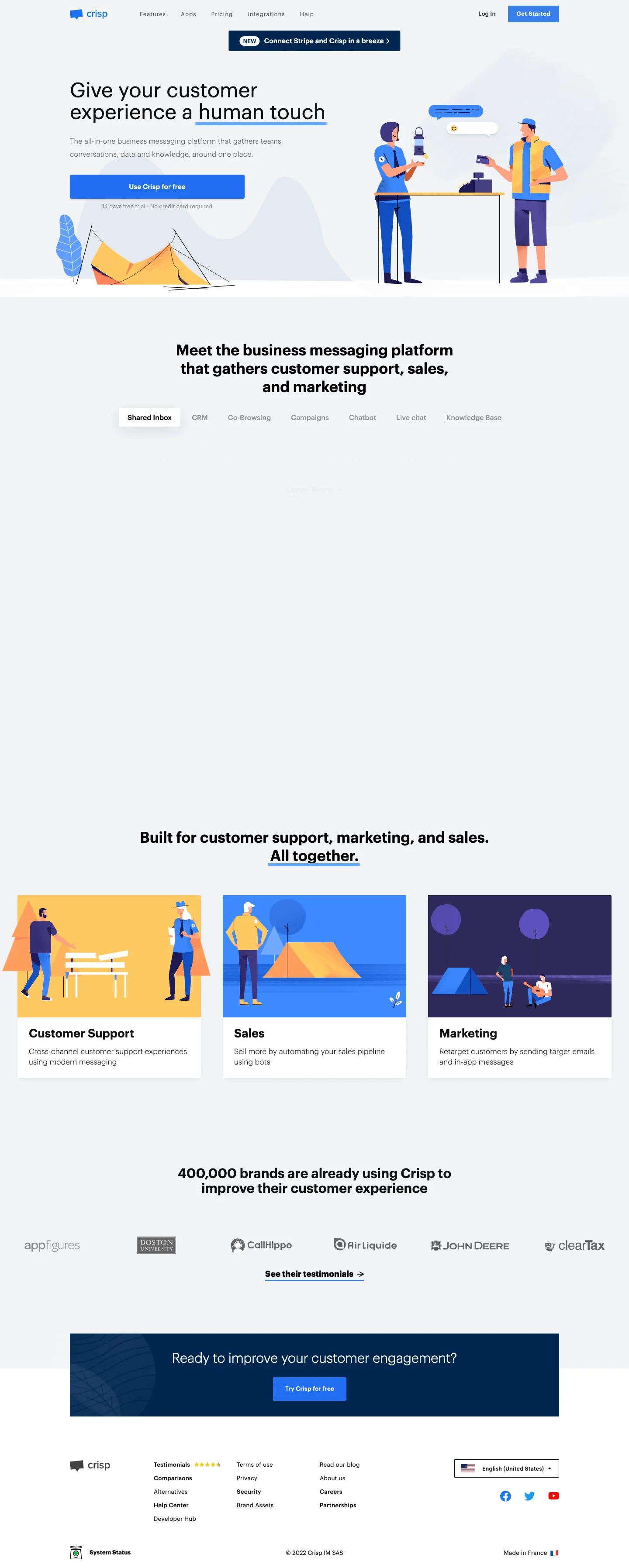
H1 opens with: "Give your customer experience a human touch" — direct product statement.
- 02
Visible section headings include: "Meet the business messaging platform that gathers customer support, sales, and marketing", "Built for customer support, marketing, and sales. All together.", "Ready to improve your customer engagement?".
- 03
Section headings later removed include: "Meet the business messaging platform that gathers customer support, sales, and marketing" and "Built for customer support, marketing, and sales. All together.".
Today: updated positioning
Click to view full screenshot
- 01
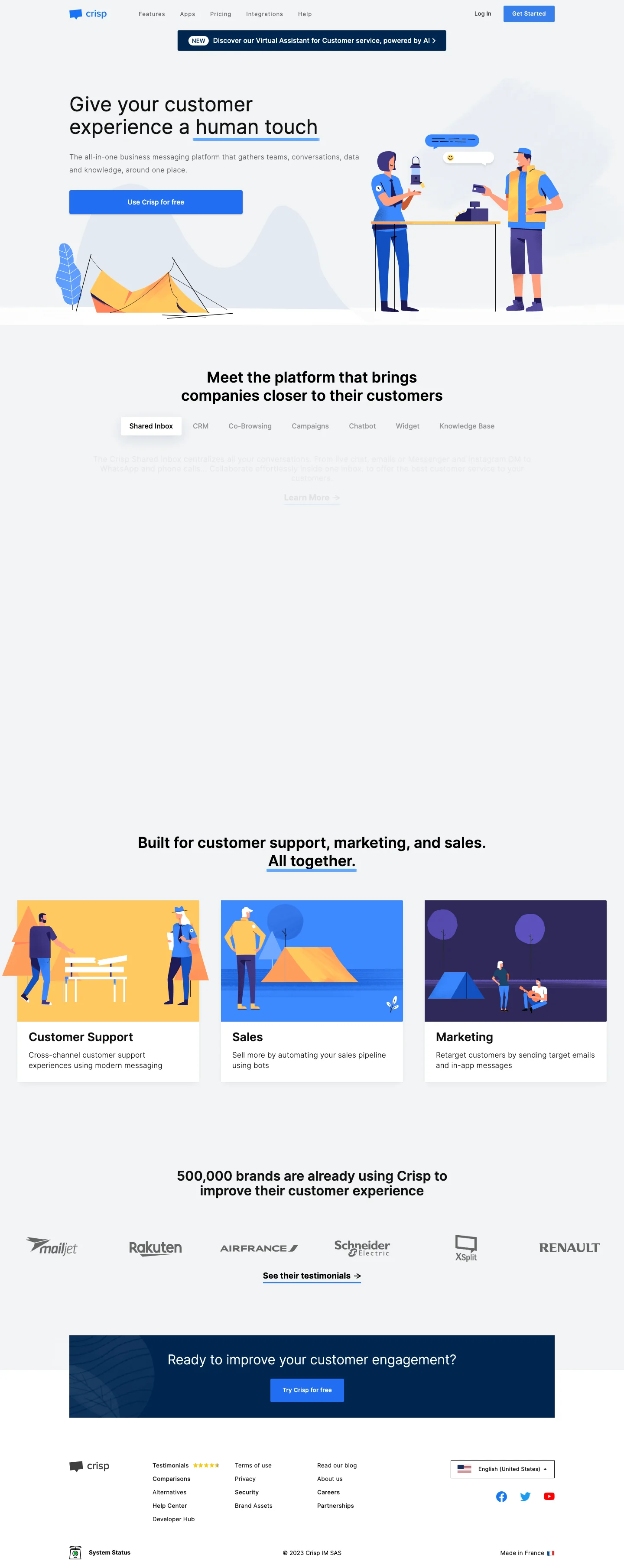
H1 now reads: "Augment your customer experience. AI made to support your team & customers." — updated value proposition.
- 02
New section headings include: "Build your perfect AI Agent in 4 steps", "Centralize all your inbound messages", "Let your users search for answers themselves".
- 03
CTAs no longer present include: "Get Started", "Learn More", "Try Crisp for free".
How the language changed
Verbatim text extracted from page snapshots. No paraphrasing.
"Give your customer experience a human touch"
"Augment your customer experience. AI made to support your team & customers."
Reading: This change can be read as a deliberate update to the primary value proposition frame. No confirmed strategy is implied.
"Discover our Business Messaging Platform for Startups & SMB's. The one stop for sales, marketing & support in one platform : Crisp. 14 Days free trial. No credit-card required. Try now ! We provide Knowledge base, Team Inbox, Chatbot, CRM and multiple other features to let you build your own way to customer success."
"Crisp is the ultimate all-in-one AI-powered multichannel messaging platform that helps businesses connect instantly with their customers or leads who are waiting for support. With its quickly evolving set of tools, Crisp is leading businesses through the AI-driven revolution by using conversations to unlock hypergrowth."
Reading: Free-trial urgency and exclamatory language removed. The new description reads as a neutral product category statement — more consistent with a platform positioning than a trial-conversion tool.
"#1 Business Messaging Platform For Startups & SMB's - Crisp"
"The AI Customer Support Platform for Every Business - Crisp"
These are observations based on text extracted from archived pages. They are not confirmed internal strategy.
What appeared and what disappeared
How the content architecture shifted
- +Build your perfect AI Agent in 4 steps
- +Centralize all your inbound messages
- +Let your users search for answers themselves
- +Craft tailor-made automated internal workflows
- +Built for customer support, marketing, and sales teams. All together.
- +10,000 companies have already made the move
- −Meet the business messaging platform that gathers customer support, sales, and marketing
- −Built for customer support, marketing, and sales. All together.
- −Ready to improve your customer engagement?
Patterns worth borrowing
These are observations and inferences — not confirmed strategy from Crisp.
Your H1 signals which buyer you are targeting
MessagingThe headline changed from "Give your customer experience a human touch" to "Augment your customer experience. AI made to support your te...". The framing of your H1 is one of the clearest signals of which buyer you are targeting and what you expect them to do next.
Section headings reveal what the team thinks buyers care about
CRO6 section headings were added and 3 removed between Jul 2022 and Jun 2026. New headings include "Build your perfect AI Agent in 4 steps" and "Centralize all your inbound messages". Headings that disappeared include "Meet the business messaging platform that gathers customer support, sales, and marketing" and "Built for customer support, marketing, and sales. All together.". The pattern of what gets added and removed is one of the clearest signals of how a team is re-prioritizing its value proposition.
Incremental changes compound into a brand shift
StrategyAcross 3 snapshots spanning roughly 4 years, no single update here was a dramatic overhaul. The end state looks very different from the start because small, consistent changes in the same direction accumulate. This is worth studying if your own homepage has been drifting without a clear direction.
The visual teardown above shows what changed. This section explains what those changes may mean for SaaS positioning, trust, CTA structure, and conversion paths.
Quick answer
Crisp's homepage headline changed from "Give your customer experience a human touch" to "Augment your customer experience. AI made to support your team & customers." — and the meta description shifted from "#1 Business Messaging Platform For Startups & SMB's" with free-trial urgency to "The AI Customer Support Platform for Every Business" with no trial language. The new framing assumes visitors already know what customer support platforms do, rather than explaining what the product replaces.
Crisp homepage: how the headline repositioned between 2022 and 2026
The 2022 headline promised "Give your customer experience a human touch" — a phrase about how support should feel. The 2026 headline now reads: "Augment your customer experience. AI made to support your team & customers."
The meta description shifted the same direction. It once read "Business Messaging Platform for Startups & SMB's." It now reads "AI-powered multichannel messaging platform."
The new headline assumes the visitor already decided AI belongs in customer support. If a visitor has not yet decided to adopt AI, the page offers no argument for why they should — only a description of what Crisp's AI does.
That shift suggests the page now targets buyers who arrive already comparing AI support tools, not buyers still evaluating whether to automate support at all.
If a visitor has not yet decided AI belongs in their support workflow, the headline assumes that decision is already made. The page describes Crisp's implementation, not the case for automation itself.
Test this on your own page: open the current Crisp homepage. The 2026 version uses "AI" in the H1, the subhead, and the first section heading. Count how many times "AI" appears before the page names a specific customer support problem (late reply times, missed chats, repetitive questions). If AI appears 3+ times before a named problem, the page assumes the visitor already decided to adopt AI.
Messaging evolution
The 2022 page spoke to founders shopping for their first customer communication tool. The page title called out "Startups & SMB's" and the meta description ended with "14 Days free trial. No credit-card required. Try now." The urgency language suggests visitors who need convincing to start a trial, not people already familiar with the category.
The current page speaks to teams comparing AI-powered support platforms. The positioning shifted from "Business Messaging Platform for Startups & SMB's" to "the ultimate all-in-one AI-powered multichannel messaging platform." The headline now reads "Augment your customer experience. AI made to support your team & customers." If the visitor is already comparing vendors, this language filters for feature-comparison shoppers rather than category learners.
The trial urgency language is gone. The page now leads with platform capabilities and AI differentiation rather than ease-of-starting signals. Open your homepage in incognito and count how many CTAs require zero commitment versus CTAs that gate everything behind signup. If all require signup, you are filtering for high-intent visitors only.
If your page explains the product but does not create trust, the problem is probably message hierarchy, proof, or CTA path friction.
CTA and navigation evolution
Crisp now prioritises AI agent CTAs over free-trial buttons. The company removed "Get Started" and "Try Crisp for free", replacing them with "Get your AI Agent" and "Start Free Trial". A new mid-page CTA appeared: "HugoYour best AI support agent teammate." The company added "Request a demo", then removed it, then added "Book a demo" back.
The homepage removed the H2 "Meet the business messaging platform that gathers customer support, sales, and marketing" — the only line that explained what category Crisp belongs to. The new CTA path assumes category knowledge because the explainer headline was removed. Visitors who arrive without knowing what Crisp does now see "Get your AI Agent" before any statement of what the platform is.
Open Crisp's Jun 2026 homepage. Note that "Get your AI Agent" appears before any H2 explaining what Crisp does. If your homepage CTAs assume category knowledge, count how many above-the-fold CTAs require zero explanation. That count signals whether your page still serves first-time visitors or only buyers already comparing vendors.
CTA and navigation evolution
Crisp added 8 navigation items and removed zero between Jul 2022 and Jun 2026 — the opposite of what most SaaS conversion advice recommends. The page simultaneously added 6 new H2 section headings while removing only 3.
This suggests a deliberate shift: the page stopped optimizing for clarity and started optimizing for coverage. That only works if visitors already understand what the product does before the page loads.
If a stranger can guess what your product does from your company name alone, you may have the brand recognition this requires. The test is not traffic volume — it is whether your homepage visitors arrive already knowing what live chat software is.
When the category explanation happens before the page loads, you can use the page to show breadth instead of defining the tool type. Crisp added navigation items like "Plugins" and "Status" — labels that assume understanding.
If your homepage still receives visitors from non-branded search terms like "customer support chat tool" or cold paid ads, adding 8 unlabeled navigation items may fragment attention before the visitor understands what you sell. The page assumes category knowledge the visitor does not yet have.
That is not an aesthetic problem — it is a positioning mismatch. The page speaks to someone further along the buyer journey than the person who actually landed on it.
Open your homepage. Count the H2 section headings that include the words "what is" or define your tool category.
Crisp removed exactly 3 category-defining H2s between Jul 2022 and Jun 2026. If you still have 3 or more H2s that explain what the product does, you likely still need them — your visitors are not yet arriving with that knowledge.
Related SaaS growth resources
Want this kind of teardown for your SaaS?
If your homepage has traffic but weak demos, the problem may not be acquisition. It may be clarity, trust, CTA structure, or conversion path friction.
Book a SaaS CRO diagnosisWant your homepage audited like this?
I review your traffic sources, message match, CTA path, proof structure, and mobile experience — then give you a specific list of what to change and why.
Book a page auditSaaS Growth Marketer and fractional growth lead. I help B2B SaaS founders diagnose landing page, CRO, positioning, and analytics leaks before scaling traffic.