SaaS Product Video: How to Test Your Product Moment Before Production
Most SaaS product videos fail because the message is wrong, not the production. Validate the product moment before spending on polished video.
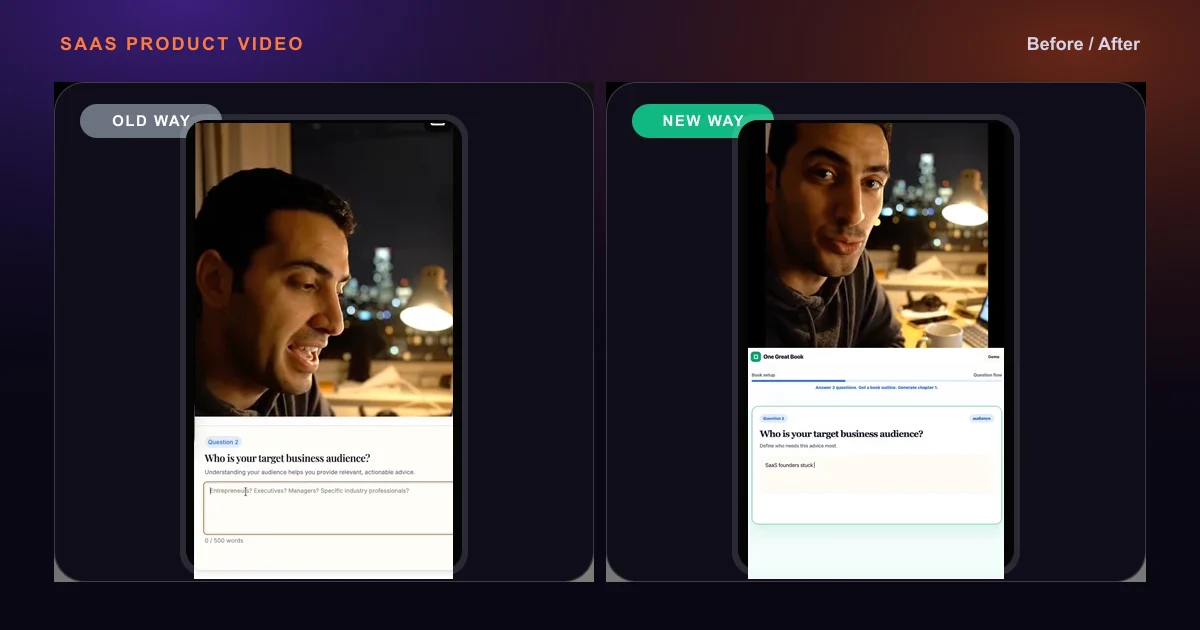
A SaaS product video should prove one product moment before you spend on polished production.
The strongest SaaS product video is not a feature tour. It shows one before-and-after transformation, matches the SaaS landing page, and gives the buyer a reason to take the next step.
Most SaaS product videos fail before they hit an audience.
Not because the production is bad. Because the message was never tested.
Teams invest in motion design, voiceover, and brand-aligned UI before they know which product moment the market actually responds to. By the time the video is done, it is built around an assumption, and if that assumption is wrong, rebuilding costs as much as the original.
This article explains a different sequence: validate the product moment first using a GPT prompt, a browser, and OBS. If it works, you now have a brief for polished production. If it does not, you spent two minutes instead of two weeks finding out.
The workflow here is built from running Meta Ads for SaaS creative, specifically from watching what failed in the first creative iteration and what changed in the second. One of those campaigns was for One Great Book, an AI SaaS tool that helps founders write business books.
What Is a SaaS Product Video?
A SaaS product video is a short video that shows your product solving a specific problem. Not a feature tour. Not a brand reel. A specific before-and-after that a cold audience can understand without context.
There are three formats you will encounter in practice: a demo video that shows the product being used, an explainer video that names the problem and mechanism, and a product demo ad that combines the product moment with a hook designed for Meta, Instagram, or YouTube.
All three fail for the same reason: the team builds them before deciding what the video is supposed to prove.
Why Most SaaS Product Videos Fail
A SaaS team decides they need a product video. They brief a designer or video editor. The brief says: show our product, make it look polished, explain the main features. The video comes back looking clean. It performs poorly. Nobody knows why.
The reason is almost always one of these:
The Better Sequence: Validate First, Produce Second
The correct order is simple. Choose the product moment, build a quick prototype, record it, test it, then invest in polish only after the signal is real.
This costs almost nothing, moves fast, and gives you evidence before you spend on production instead of intuition after production.
Choose the product moment
Define the smallest visible before-and-after your SaaS creates for the buyer.
Build a quick prototype in HTML
Use GPT to create a focused browser demo that shows only the transformation.
Record the workflow with OBS
Capture the browser demo in the format your placement requires.
Add a human hook if needed
Use a direct talking-head clip when the problem needs emotional recognition before the demo.
Run it on Meta or place it on the landing page
Use the video where it can create measurable scroll-stop, click, or conversion behavior.
Read the four signals
Look at hook rate, hold rate, CTR, and landing page message match before editing the polish.
Invest in polished production after validation
Once the product moment works, the evidence becomes the creative brief.
Step 1: Define the Product Moment
Before you open GPT, answer one question: What is the smallest visible transformation your product creates?
That is the product moment. It is not a feature description. It is a before-and-after that a stranger can grasp in under five seconds.
Feature version: Three summarization modes with multi-document support.
Product moment version: Forty pages of meeting notes become a five-point summary with action items in thirty seconds.
The feature requires the viewer to imagine the result. The product moment makes the result visible. On Meta, visible beats imaginable every time.
- Disorganized call notes become a formatted client-ready report in thirty seconds.
- A blank content brief becomes a complete campaign outline with a single click.
- A stack of support tickets becomes a categorized trend summary overnight.
- A forty-page RFP becomes five prioritized decision points before the next meeting.
Step 2: Build a SaaS Product Demo With GPT and HTML
The HTML demo is the core of this workflow. It is not a mockup or a slide. It is a functional browser interface that shows the before state, the action, and the after state, recorded directly and turned into a video.
Why HTML instead of screen recording the real product? Your actual product UI often has noise: navigation menus, notification dots, empty states, loading indicators, unrelated features. The HTML demo strips all of that and shows only the product moment. For ad testing, that clarity is more important than authenticity.
Prompt: Create a single HTML page for a 1920x1080 viewport, formatted as a SaaS product demo. On the left side, show disorganized meeting notes. In the center, place a large button labeled Generate Report. When clicked, animate the right panel filling with a clean client report: headline, three sections, action items, and next steps. Use large typography, dark background, white text, no navigation, no branding, no small labels. Just the before state, the action, and the after state.
- If the viewer needs to zoom in to read the UI, the demo fails in the first three seconds.
- Every label and output should be readable at full screen on a mobile device.
- No menus, notification counts, or footer text.
- Every element that is not the before state, the action, or the after state is a distraction.
- The wow moment needs to look clearly different from the before state.
- If both panels look similar, the viewer does not register what changed.
- For split-screen Meta formats, format the HTML at the exact split ratio.
- A full-width demo squeezed into a 50/50 split will crop critical elements.
Step 3: Record the Demo With OBS
Open OBS and set the capture source to your browser window.
For vertical Meta placements, set output to 1080x1920. For horizontal or split-screen formats, set output to 1920x1080.
Safe zone rule: Meta and Instagram overlay interaction buttons at the bottom and right edges of the screen. Keep the product moment and CTA text in the center of the frame, away from the edges. If the wow moment is in the bottom-right corner, it will be covered on every Reels placement.
Record the demo at normal speed. The viewer needs to register what changed, not just see that something happened quickly. Total recording time should stay under sixty seconds.
Step 4: Add Sound and Captions
This step is skipped by most SaaS teams. It is a measurable error.
Sound directs attention. A typing sound under the before state tells the viewer something is happening. A clean click at the button press signals the transition. A subtle reveal sound as the after state appears punctuates the wow moment. These sounds are not decoration; they are focus cues.
None of this requires audio production. Free sound libraries have all three. Add them directly to the HTML using JavaScript audio triggers, or layer them in post using CapCut or DaVinci Resolve.
Burned-in captions increase completion and CTR. Not because every viewer watches silently, but because captions keep viewers oriented during transitions. Keep caption text large, high-contrast, and positioned away from platform UI zones.
Step 5: Add a UGC Hook
A screen recording demo is testable. A screen recording demo combined with a human hook is stronger.
The human element creates emotional recognition before the product moment creates logical validation. The format looks like this: a talking-head clip in the top half of the frame names the problem. The HTML demo in the bottom half shows the solution.
From a real campaign: this is the format used in Meta Ads for One Great Book across two iterations. The first iteration used a simpler UI with a looser product moment. The second iteration tightened the demo to match the hook and made the transformation more visually distinct. The structure, human hook above and product demo below, stayed consistent because it worked.
- A phone, a window, and one honest line is enough.
- Use the line to name the painful before state before the product demo shows the after state.
- Arcads can generate a presenter clip for testing.
- Combine the presenter clip with the OBS recording before exporting the ad.
- For longer clips, audio quality can degrade.
- Generate the visual, then record or generate a clean voiceover and sync it in post.
- Place the presenter in front of the demo only when pointing or reacting improves clarity.
- CapCut handles background removal without requiring editing experience.
Step 6: Match the Video to the Landing Page
This is where most SaaS ad funnels break silently, and it is directly relevant if you are using the demo on a landing page or linking an ad to a product page.
If the video says: Turn messy meeting notes into client-ready reports in thirty seconds, the landing page headline should say exactly that, not AI-powered productivity for modern teams.
The visitor clicked because they recognized the product moment. When the landing page does not continue that same promise in the same language, they experience a gap. Most of them leave. The ad looks like it failed. The actual failure is the message disconnect.
Same transformation. Same language. Same visual proof, with more detail.
This is one of the most common conversion leaks in SaaS paid acquisition. The ad creative does its job. The landing page undoes it.
If you are working on this problem, where traffic is arriving but not converting, the SaaS landing page optimization service and conversion rate optimization work are where most of this gets fixed.
How to Measure Whether a SaaS Product Video Is Working
These are practical signals, not universal benchmarks. Use them as directional guides, not hard rules. The 25% hook rate threshold is consistent with multi-account studies from practitioners tracking Meta video performance; Vaizle's 2025 review of Meta video ads puts 20-25% as a solid baseline, with top performers exceeding 30%.
- Directional target: at least 25%.
- If below target, rebuild the opening frame or hook line.
- Directional target: at least 20%.
- If below target, tighten the demo and move the wow moment earlier.
- Directional target: at least 0.8%.
- If below target, replace the angle, not just the execution.
- The hero should mirror the ad promise.
- If it does not, rewrite the landing page headline and measure bounce rate after the click.
Common SaaS Product Video Mistakes
Most SaaS product video problems are not production problems. They are message, sequence, and placement problems.
SaaS Product Video Script Framework
A simple five-part structure works across demo ads, landing page videos, and explainer formats.
This structure works because it mirrors how buyers actually think. They are not looking for features. They are looking for evidence that the problem they have right now will be solved.
Before state
Name the painful situation clearly. Use specific language the viewer already uses internally.
Product action
Show the trigger: the button press, the input, or the one moment that starts the transformation.
After state
Reveal the result. Make it visually distinct and immediately comprehensible.
Outcome
State what this means for the viewer: time saved, quality improved, or work eliminated.
Next step
Use a single, low-friction action: watch the demo, try it free, or book a call.
When to Invest in Polished Production
Once the numbers clear the thresholds above, you have something more valuable than a polished video: you have evidence that the product moment works.
That evidence is the brief for polished production.
The brief becomes simple: same before state, same action, same after state, with production quality that reflects the brand. The motion designer or video editor does not need to invent the concept. Their job is to make the validated concept look its best.
This is the correct order. It is also the reverse of how most SaaS teams approach it. They produce first and validate second, which means most polished SaaS product videos are built on untested assumptions about what the market cares about.
If the bigger issue is channel order, use the SaaS marketing plan and B2B SaaS marketing strategy pages to map where video belongs in the wider growth system.
I will review the ad angle, SaaS landing page match, conversion path, and the product moment buyers actually need to see.
Frequently Asked Questions
What is a SaaS product video?
A SaaS product video is a short video that shows your software solving a specific problem. The most effective ones focus on a single product moment, the before-and-after transformation, rather than a list of features or a general brand overview.
How long should a SaaS product video be?
For paid ads, aim for 15-30 seconds. The product moment should appear before the 10-second mark. For landing page demos and explainer videos, 60-90 seconds is a reasonable range, long enough to show the transformation clearly, short enough to hold attention. For bottom-of-funnel product tours, 2-3 minutes is acceptable if the viewer is already considering a purchase.
Where should I use a SaaS product video?
The highest-impact placements are above the fold on your landing page, in Meta and Instagram Reels ad campaigns, on YouTube pre-roll for awareness, in sales emails and demo follow-ups, and on product pages for specific features. The landing page placement is often most underused because a 30-second demo above the fold can reduce friction faster than copy alone.
Should I create a polished SaaS video first?
No. Validate the product moment first with a prototype. A polished video built around the wrong angle is not better than a rough prototype built around the right one; it is just harder to replace. Use the prototype to test the hook, the transformation, and the landing page match. Invest in production once you have signal.
Can a SaaS product video improve landing page conversion?
Yes, but only if the video shows the same transformation as the landing page headline. A video that demonstrates a clear product moment reduces cognitive load for the visitor: instead of reading and imagining the result, they see it. That reduces hesitation and increases the chance they take the next step. The risk is when the video and the landing page say different things; that disconnect increases bounce rate.
What should a SaaS product demo video include?
A named before state that the viewer recognizes immediately, a visible product action, a clear and high-contrast after state, a stated outcome or benefit, and a single next step. Optional but effective: a human hook that names the problem before the demo plays, burned-in captions, and attention cues timed to the transition.
Need a SaaS product video that matches the funnel?
If your SaaS landing page or ad funnel is not converting, the problem may be the message, the product moment, the landing page match, or the conversion path.
Book a 20-min GTM AuditExternal source: Hook rate and hold rate targets in this article are directional testing signals, supported by practitioner benchmark reporting from Vaizle. Vaizle hook rate and hold rate review.
SaaS Growth Marketer and fractional growth lead. I help B2B SaaS teams fix positioning, landing pages, outreach, and conversion before they scale traffic.